
Access Ymail: Yahoomail Sign In, Email Settings and Help
Ymail: Login, Troubleshooting, and FAQ
Welcome. If your email ends in @ymail, you have an older Yahoo email account, and yes it still works. Ymail is a secondary domain owned by Yahoo, launched years ago to provide users with more username options. Here we will share the updated Ymail Login url, give your help if you can’t log in and show you the Ymail technical server settings. An much much. more.
What is Ymail?
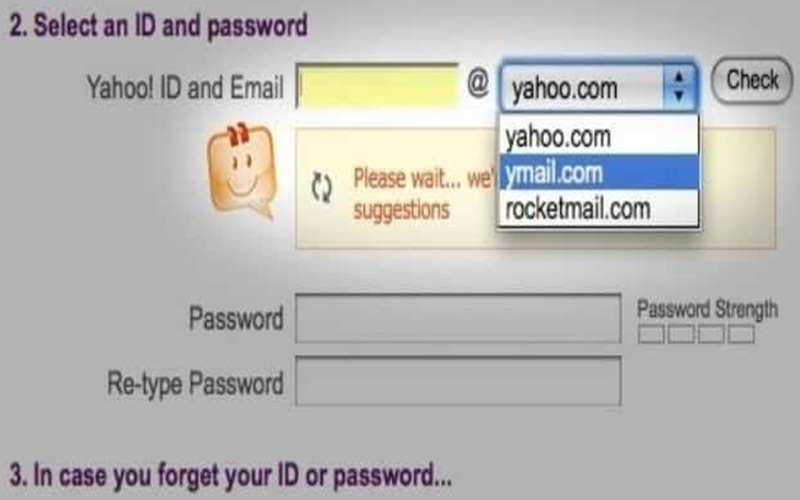
Ymail is an alternative domain suffix for Yahoo Mail that was introduced in 2008. At that time, Yahoo’s primary domain was so saturated that it was nearly impossible for new users to find a professional-looking username. By launching www.Ymail.com, Yahoo allowed a new generation of users to claim addresses like “[email protected]” while still using the standard Yahoo Mail infrastructure.
Is Ymail a Thing? (Is it still running?)
Yes, Ymail is still an active “thing,” but with a caveat. While existing @ymail.com addresses work perfectly, Yahoo has largely stopped allowing new users to sign up for this specific suffix. If you currently own a Ymail account, you can continue to use it indefinitely, as it is fully integrated into the modern Yahoo Mail ecosystem.
Ymail vs Yahoo: What’s the Difference?
In the ymail vs yahoo debate, the truth is that they are technically the same service. The only difference is the text that appears after the “@” symbol in your email address. Both use the same servers, the same login portal, and the same mobile app; a Ymail user has access to all the same features as a standard Yahoo user.
Why is www.ymail.com Redirecting to login.yahoo.com?
Many users worry when they type www.ymail.com and find themselves at a Yahoo-branded login screen. This redirection is 100% legit. Yahoo consolidated all its mail domains (including Ymail and Rocketmail) into a single secure authentication gateway to simplify security updates and user management.
Note on www.yahoomail.com: If you find www.yahoomail.com redirecting to login.mail.com, be careful. Mail.com is a separate provider. Always ensure your browser address bar says login.yahoo.com before entering your password to stay safe from phishing.
Step-by-Step Guide to Ymail Login
- Visit the Portal: Open your browser and type www.ymail.com or login.yahoo.com.
- Enter Address: Type your full email address (e.g., [email protected]) and click “Next.”
- Enter Password: Input your secret password carefully.
- Two-Factor Check: If enabled, enter the verification code sent to your mobile phone.
- Access Inbox: You will be directed immediately to your Ymail messages.
Yahoo Mail Login Troubleshooting Guide
If you are experiencing a “Login Failed” message, it is usually a minor configuration error or a security flag. Follow these expanded steps to restore access to your account.
1 Check Caps Lock and Keyboard Layout
Yahoo passwords are strictly case-sensitive. Beyond just the Caps Lock key, ensure your keyboard layout hasn’t switched (e.g., from US to UK or QWERTY to AZERTY), as this changes the location of special characters like @, #, or !. Always check your keyboard’s indicator lights or type your password into a visible text document first to verify accuracy.
2 Watch for “Visual Impostor” Characters
Many users confuse a lowercase “L” (l) with the number one (1), or a capital “O” with a zero (0). If you are copying and pasting your password, ensure you aren’t accidentally highlighting an extra space at the beginning or end, as Yahoo treats spaces as characters. Use the “eye” icon in the password field to reveal your typing and eliminate guesswork.
3 Disable VPNs and Proxies
Yahoo’s security algorithms are designed to block “suspicious” traffic. If your VPN is routing your connection through a different country, Yahoo may trigger a security challenge or a “temporary lock” to prevent a suspected hack. Turn off your VPN, refresh the page, and try logging in from your actual IP address to satisfy regional security checks.
4 Audit Browser Extensions and Ad-Blockers
Aggressive ad-blockers or “Tracking Protection” settings can prevent the Yahoo login Javascript from executing. If you see a spinning wheel or a blank white box where the password field should be, disable your extensions. Adding login.yahoo.com to your ad-blocker’s “Whitelist” is often the permanent fix for this script conflict.
5 Use Incognito Mode to Bypass Cache
Your browser’s cache may be storing an expired “session cookie,” leading to a Login Loop (where the page just refreshes after you enter your password). Opening an “Incognito” or “Private” window forces the browser to ignore old data. If this works, you must clear your main browser’s cookies and cache for “All Time” to fix the issue permanently.
6 Reset Your Network Connection
If the Yahoo Mail app or website hangs on “Connecting…”, your router’s DNS cache might be stale. Power-cycle your modem by unplugging it for 60 seconds. On mobile devices, try toggling Airplane Mode on and off to force a fresh handshake with the local cell tower or Wi-Fi node.
7 Test via the Yahoo Mail Mobile App
If the desktop site fails, try the official Yahoo Mail app on iOS or Android using cellular data (not Wi-Fi). This isolates the problem: if the app works, the issue is likely your computer’s firewall or browser. If the app also fails, the issue is likely with the Yahoo account itself or their global servers.
8 Enable JavaScript and Update Security Protocols
Yahoo requires TLS 1.2 or higher and enabled JavaScript to function. If you are using an outdated browser or a legacy operating system (like Windows 7), the secure “handshake” required for login will fail. Ensure you are running the latest version of Chrome, Firefox, or Edge to meet modern encryption standards.
9 Check Storage Limits and Dormancy
Yahoo accounts may be marked as “Dormant” if not accessed via a browser for 12 months, which can lead to a deletion of data. Furthermore, while Yahoo offers a massive 1TB of storage, reaching that limit can cause “Account Restricted” errors. Check the Yahoo Account Info page to ensure your status is “Active” and your storage hasn’t been capped.
10 Verify the Official URL (Anti-Phishing)
Ensure the URL in your address bar starts with https://login.yahoo.com. Scammers often use “look-alike” domains to steal credentials. Look for the padlock icon in the address bar. If the site looks “off” or asks for your social security number or credit card to “unlock” your mail, leave immediately—it is a phishing attempt.
11 Use “App Passwords” for Third-Party Apps
If you are trying to log in via Outlook, Apple Mail, or a legacy mail client and your “real” password isn’t working, it is because Yahoo requires an App Password. You must go to your Yahoo Security settings, select “Generate App Password,” and use that unique 16-character code instead of your regular password for that specific app.
12 Troubleshoot Yahoo Account Key
If you have “Account Key” enabled, Yahoo won’t ask for a password—it sends a notification to your phone. If you aren’t receiving the ping, ensure your phone has a data connection and that notifications are enabled for the Yahoo app. If you lost your phone, you will need to use your “Recovery Email” or “Recovery SMS” to regain access.
Managing Your Ymail Account
- Change Password: Log in, go to “Account Security,” and select “Change password.”
- Reset Password: Use the “Forgot password?” link on the login screen to receive a code via SMS or recovery email.
- Change Username: You cannot change a primary Ymail username. However, you can create a “Disposable Email Address” or an alias in your settings.
- Account Recovery: Ensure your mobile number is updated in “Account Info” to avoid being locked out permanently.
Ymail Technical Settings (IMAP/SMTP)
To use Ymail with third-party apps like Outlook or Apple Mail, use the settings below. If you use Two-Factor Authentication, you must generate a 16-character “App Password” in your Yahoo settings.
| Setting Type | Server Address | Port | Security/SSL |
|---|---|---|---|
| Outgoing (SMTP) | smtp.mail.yahoo.com | 465 or 587 | SSL/TLS Required |
| Incoming (IMAP) | imap.mail.yahoo.com | 993 | SSL Required |
| Incoming (POP3) | pop.mail.yahoo.com | 995 | SSL Required |
Ymail and Yahoo Mail FAQ
Section 1: Ymail Login & International Access
How to log in to your Ymail email account from mobile and desktop?
On a desktop, navigate to www.ymail.com and enter your full address and password into the sign-in box. For mobile users, the most stable method is downloading the official Yahoo Mail app from the App Store or Play Store. Once installed, simply tap “Sign In” and provide your Ymail credentials to sync your folders instantly.
¿Cómo iniciar sesión en mi cuenta de correo electrónico Ymail?
Para iniciar sesión en su cuenta de Ymail, visite el sitio web oficial de Yahoo en su navegador preferido. Ingrese su dirección de correo electrónico completa y su contraseña para acceder a su bandeja de entrada. También puede utilizar la aplicación móvil de Yahoo Mail para un acceso más rápido desde su teléfono.
Como fazer login na minha conta de e-mail Ymail?
Para acessar sua conta Ymail, vá para a página de login do Yahoo no seu navegador. Digite seu endereço de e-mail completo e a senha correspondente para entrar no sistema. Se preferir, baixe o aplicativo Yahoo Mail no seu celular para gerenciar suas mensagens de qualquer lugar com facilidade.
Comment se connecter à mon compte de messagerie Ymail ?
Pour vous connecter à votre compte Ymail, rendez-vous sur la page d’accueil de Yahoo Mail via votre navigateur Web. Saisissez votre adresse e-mail complète ainsi que votre mot de passe pour accéder à vos messages. Vous pouvez également utiliser l’application mobile Yahoo Mail pour une consultation simplifiée sur votre smartphone.
Wie melde ich mich bei meinem Ymail-E-Mail-Konto an?
Um sich bei Ihrem Ymail-Konto anzumelden, besuchen Sie die Yahoo-Login-Seite in Ihrem Webbrowser. Geben Sie Ihre vollständige E-Mail-Adresse und Ihr Passwort in die entsprechenden Felder ein. Alternativ können Sie die Yahoo Mail-App auf Ihrem Smartphone installieren, um Ihre E-Mails auch unterwegs bequem zu verwalten.
Come accedere al mio account e-mail Ymail?
Per accedere al tuo account Ymail, collegati alla pagina di login di Yahoo utilizzando il tuo browser preferito. Inserisci il tuo indirizzo e-mail completo e la tua password per entrare nella tua casella di posta. È inoltre possibile scaricare l’app Yahoo Mail sul proprio dispositivo mobile per un accesso immediato e sicuro.
Section 2: Identity and Comparisons
Is Ymail an actual email address?
Yes, Ymail is a completely legitimate email address domain suffix owned by Yahoo. It was launched in 2008 as a way to give new users more options when @yahoo.com addresses became scarce. It functions exactly like a standard Yahoo address and uses the same infrastructure for sending and receiving mail.
Do people still use Ymail?
Millions of people worldwide still actively use their Ymail addresses for personal and business correspondence. Since the domain was popular for several years, many users have kept it as their primary digital identity. It remains fully supported by Yahoo, and there is no plan to discontinue existing @ymail.com accounts.
Is Ymail the same thing as Gmail?
No, Ymail and Gmail are entirely separate services provided by different companies. Ymail is a product of Yahoo, whereas Gmail is the email service provided by Google. While they both offer similar webmail features, they have different storage limits, user interfaces, and security protocols.
Is Yahoo now Ymail?
No, Yahoo is the parent company and the primary brand, while Ymail was simply an alternative domain suffix they offered. All Ymail accounts are technically “Yahoo Mail” accounts in terms of features and management. Today, Yahoo focuses mostly on its primary @yahoo.com domain, but Ymail remains a recognized part of the brand.
What is the most hacked email service?
Historically, Yahoo (which includes Ymail) suffered several high-profile data breaches in 2013 and 2014, making it a common topic in cybersecurity discussions. However, the company has since implemented robust security measures like Account Key and Two-Factor Authentication. Regardless of the provider, any account without strong security settings is at risk of being hacked.
Can Yahoo emails be transferred to Gmail?
Yes, you can easily transfer your Yahoo and Ymail messages to Gmail using Google’s “Import Mail and Contacts” tool. This feature allows Gmail to fetch your history and even forward new incoming mail for 30 days. It is a popular choice for users who want to consolidate multiple accounts into a single Google inbox.
Is Ymail better than other email?
Whether Ymail is “better” depends on your specific needs, particularly regarding the user interface and news integration. Many users enjoy the built-in Yahoo news feed and the specialized “Views” for photos and documents. However, competing services like Gmail or Outlook may offer better integration with professional productivity suites.
What are the benefits of using Ymail?
The primary benefit of Ymail is its integration with the broader Yahoo ecosystem, including Finance, Sports, and News. It also offers a very generous storage capacity compared to the basic 15GB offered by some competitors. Additionally, Ymail users can utilize “Disposable Email Addresses” to protect their primary inbox from spam when signing up for websites.
Does Ymail and Yahoo Mail allow email forwarding?
Yahoo Mail does support email forwarding, but this feature is often reserved for users with a “Yahoo Mail Plus” subscription. If you have a free account, you may need to use IMAP or POP3 to pull your mail into a different client. Always check your specific account settings under “More Settings” to see the options available in your region.
How secure is Ymail?
Ymail is quite secure as long as you take advantage of the modern security tools Yahoo provides. By enabling Two-Factor Authentication (2FA) or using the “Yahoo Account Key,” you can effectively protect your inbox from unauthorized access. Yahoo also uses advanced encryption to protect your data while it is in transit between servers.
Section 3: Common User Problems (Reddit & Forum Insights)
Why is my Ymail storage lower than 1TB?
Recent updates in 2025 and 2026 have seen Yahoo reduce the free storage limit for many users from 1TB down to 15GB or 20GB. Users on forums like Reddit have noted that this change is being rolled out globally to encourage subscriptions to Yahoo Mail Plus. If your storage has suddenly decreased, you may need to delete large attachments or upgrade your plan.
Is Ymail down? How do I check?
If you suspect Ymail is down, the most reliable way to check is by visiting a site like Downdetector or checking the official @YahooCare handle on social media. These platforms provide real-time updates based on user reports of outages. If you see a massive spike in reports, the issue is likely on Yahoo’s end and will be resolved shortly.
Why can’t I receive emails on my Ymail account?
The most common reason for not receiving emails is that your inbox has reached its storage limit. Check your storage meter in the bottom-left corner of the web interface to see if you are at 100% capacity. You should also check your “Filters” and “Blocked Addresses” to ensure you haven’t accidentally set a rule that is deleting incoming mail.
How do I stop spam in my Ymail inbox?
To stop spam, always use the “Spam” button rather than just deleting the message, as this teaches Yahoo’s filters what to look for. You can also create custom “Filters” in your settings to automatically move messages containing specific keywords to the trash. For persistent offenders, use the “Block Senders” feature to stop them from reaching you entirely.
Why do my Ymail images not load automatically?
Yahoo Mail often blocks images by default to protect you from “tracking pixels” used by advertisers. You can change this behavior by going to “Settings,” then “More Settings,” and selecting “Viewing email.” Toggle the option to “Always show images” if you want them to load without clicking a button every time.
How do I recover a deleted Ymail account?
If you have deactivated your account, you usually have a 30-day window to log in and reactivate it before the data is purged. However, if the account was deleted for inactivity (over 12 months), it may be permanently gone. You can try using the “Sign-in Helper” on the login page to see if any recovery options are still linked to the address.
Can I change my Ymail display name?
Yes, you can change the name that recipients see when they get an email from you. Navigate to “Settings,” then “More Settings,” and click on “Mailboxes.” Select your Ymail account, and you will see a field labeled “Your Name” where you can enter a new display name.
How do I delete old emails in bulk on Ymail?
To delete emails in bulk, you can click the checkbox at the very top of your message list to “Select All.” You can also use the search bar to find all emails from a specific year or sender and then delete them all at once. Remember to empty your “Trash” folder afterward to actually free up storage space.
What is a Yahoo App Password?
An App Password is a 16-character code used to log into third-party apps like Outlook or Apple Mail when Two-Factor Authentication is active. Since these apps don’t support the standard 2FA prompt, the App Password acts as a secure bypass. You can generate these passwords in the “Account Security” section of your Yahoo settings.
Is there a Ymail app for iPhone?
There is no separate app for Ymail because it uses the standard Yahoo Mail app available on the App Store. Once you download the Yahoo Mail app, you can sign in using your @ymail.com address just like a regular account. The app is optimized for iOS and offers features like customizable swipe gestures and dark mode.
Does Ymail have a “Undo Send” feature?
Yahoo Mail does offer an “Undo Send” feature, but it only gives you a very short window—usually about 5 to 10 seconds. After you hit send, a small notification will appear at the bottom of the screen with an “Undo” button. Once that notification disappears, the email is sent permanently and cannot be pulled back.
How do I export my contacts from Ymail?
To export your contacts, click the “Contacts” icon in the right-hand sidebar of your inbox. Select the “Actions” or “More” menu and choose “Export to CSV” or “Export to Outlook.” This will download a file that you can then upload to a different email service or contact manager.
Why is Ymail so slow on my browser?
Slowness is often caused by an accumulation of browser cookies or too many open tabs using up your computer’s RAM. Try clearing your browser’s history and cookies to give Ymail a fresh start. Additionally, ensuring that your browser is updated to the latest version can significantly improve the performance of the web interface.
Can I use Ymail on a Kindle Fire?
Yes, you can use Ymail on a Kindle Fire by using the built-in “Email” app provided by Amazon. You will need to enter the IMAP and SMTP settings manually if the app doesn’t recognize the domain automatically. Alternatively, you can always access your mail using the Silk browser on the Kindle device.
How do I block someone on Ymail?
To block a sender, open an email from them and click the “More” icon (the three dots) in the top toolbar. Select “Block Senders” and choose whether you want to delete all existing messages from that person as well. Once blocked, their emails will never reach your inbox again.
What happens if I forget my Ymail username?
If you forget your username, you can use the Yahoo Sign-in Helper tool to find it using your recovery phone number or alternate email. Yahoo will send a verification code to your recovery method and then list all accounts associated with it. This is why it is critical to keep your recovery information up to date.
Is Ymail compatible with dark mode?
Yes, Ymail supports dark mode on both the web interface and the mobile app. On the web, you can find this under the “Themes” menu in your settings. On mobile, the app usually follows your system’s global settings, but you can also toggle it manually in the app’s internal preferences.
How do I report a phishing attempt in Ymail?
If you receive a suspicious email asking for your password, do not click any links and click the “Spam” button instead. From the dropdown menu, select “Report Phishing” to alert Yahoo’s security team. Reporting these emails helps protect the rest of the community from similar attacks.
Can I use Ymail for my business?
While you can use a personal Ymail account for business, it lacks the professional appearance of a custom domain. Yahoo offers a “Business Mail” service that allows you to use your own domain while keeping the familiar Yahoo interface. This is generally recommended for entrepreneurs who want to build a more formal brand image.
How do I sync Ymail with my Samsung phone?
On a Samsung phone, go to “Settings,” then “Accounts,” and select “Add Account.” Choose “Yahoo” from the list and sign in with your Ymail credentials to sync your mail, calendar, and contacts. You can also simply download the Yahoo Mail app from the Galaxy Store for a more integrated experience.
Why does Ymail keep asking me to “Agree to New Terms”?
This usually happens when Yahoo updates its privacy policy or when you are logging in from a new device or browser. You must agree to the updated terms to continue using the service. If the prompt keeps reappearing, it may be because your browser is not saving the “consent” cookie correctly.
How do I organize my Ymail with folders?
You can create folders by clicking “New Folder” in the left-hand navigation pane of your inbox. Once created, you can drag and drop emails into these folders to keep your main inbox clean. You can also set up “Filters” to automatically route incoming mail from specific senders into these folders.
Does Ymail have a calendar?
Yes, Ymail includes a full-featured calendar that allows you to schedule appointments and set reminders. You can access it by clicking the calendar icon in the right-hand sidebar of your inbox. The calendar syncs across all your devices, so you will receive notifications on both your desktop and your phone.
How do I change the language of my Ymail?
To change the language, go to your account settings and look for the “Preferences” or “Language” section. Select your preferred language from the list, and the interface will update immediately. Note that this only changes the menu labels and buttons, not the content of the emails themselves.
Why is my Ymail account “Temporary Error 14”?
Error 14 is a common Yahoo error that usually indicates a temporary synchronization issue with the server. Most of the time, simply logging out and logging back in will resolve the problem. If it persists, try clearing your browser’s cookies or waiting 30 minutes for the server to finish maintenance.
How do I print an email from Ymail?
To print an email, open the message and click the “More” icon (three dots) to find the “Print” option. This will open a new window with a printer-friendly version of the text. From there, you can select your local printer and finalize the document as you would with any other webpage.
Can I search my Ymail by date?
Yes, you can use advanced search operators in the Ymail search bar to find emails from specific dates. For example, typing “after:2023/01/01” will show all emails received after that date. This is an excellent way to narrow down thousands of messages when looking for a specific receipt or conversation.
What is the attachment limit for Ymail?
Ymail allows you to send attachments up to 25MB in a single email. If you need to send larger files, Yahoo integrates with Google Drive and Dropbox to allow you to share links instead. This ensures that your recipient can download the files regardless of their own email provider’s size limits.
How do I set an “Out of Office” reply?
Go to “Settings,” then “More Settings,” and select “Vacation Response.” Here you can toggle the auto-reply on and write a custom message for people who email you while you are away. Be sure to set the start and end dates so the reply stops automatically when you return.
Is Ymail better than Outlook?
Whether Ymail is better than Outlook depends on your preference for interface design and integrated tools. Ymail is often praised for its simplicity and excellent mobile app, while Outlook is favored for its deep integration with the Microsoft Office suite. Both offer robust security, so the choice usually comes down to personal taste.