
Access TWC Mail – TWCNY Email and TWCBC Mail Sign In
Access TWC Mail (TWCNY Email & TWCBC Sign In)
If you have been trying to sign in to an old Time Warner Cable email account. But nothing seems to work the way it used to. Then you are not imagining it. Many casual email users still search for TWC Mail, TWCNY email, Roadrunner mail, or Business Class login pages because those were the names and bookmarks they used for years. The confusing part is that the email address may still be the same, but the login system behind it has changed.
That change happened because Time Warner Cable was rebranded under Spectrum. As a result, older email domains such as @twc.com, @rr.com, and regional addresses like @twcny.rr.com were moved into Spectrum’s larger webmail system. In simple terms, your email inbox may still exist, but the old login doors mostly do not. Instead of trying several retired pages, it is usually easier to go straight to the current Spectrum webmail portal and sign in there using your full email address.
This guide is written for everyday email users, not IT professionals. It explains where to log in, how residential and business accounts differ, what to do if old TWC bookmarks no longer work, how to set up your email in Outlook or on a phone, and how to fix common problems such as password loops, redirect errors, and “account not found” messages. It also includes a large FAQ section for older TWC, Roadrunner, TWCNY, and TWCBC-related searches.
TWC Mail Moved to Spectrum
The biggest thing to understand is this: older Time Warner Cable and Roadrunner email accounts are now handled through Spectrum’s systems. That is why a bookmark that worked years ago may now redirect, fail, or send you to a more general Spectrum page. For many users, this makes it feel like their email has disappeared when in reality only the login method has changed.
If you still use a legacy email address such as [email protected], [email protected], or a regional variation like [email protected], you should normally try logging in through Spectrum Webmail first. Always enter your full email address, not just the first part before the @ symbol. That small detail causes a lot of failed sign-in attempts.
How to Log In to Residential TWC Mail and Roadrunner Email
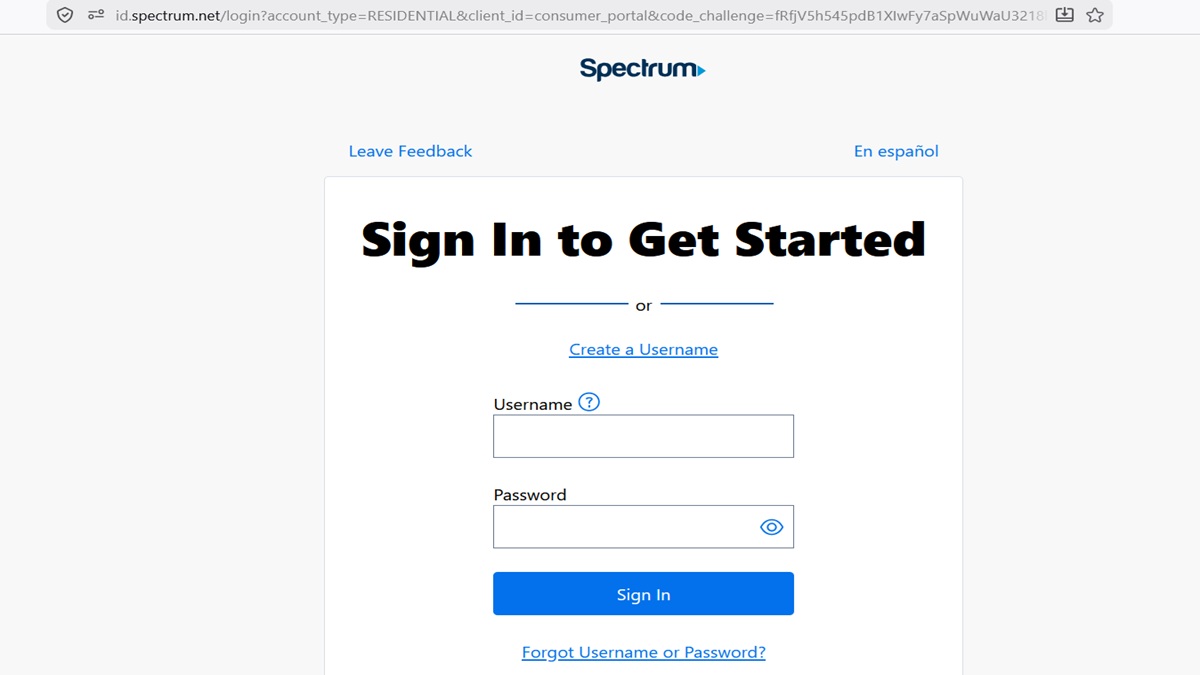
Most residential users should stop using old TWC webmail bookmarks and use the modern Spectrum webmail sign-in page instead. This is the easiest path for people with old Time Warner Cable and Roadrunner addresses that are still active.
Step 1: Open the Current Webmail Page
Go to the current Spectrum Webmail login page. If an old page such as mail.twc.com redirects, do not keep fighting it. A redirect usually means the legacy login route has been folded into Spectrum’s current sign-in system.
Step 2: Enter the Full Email Address
Type the complete email address, such as [email protected], [email protected], or [email protected]. Do not enter only the username. Many login failures happen because users forget the domain portion and the system cannot identify the correct mailbox.
Step 3: Enter the Email Password
Use the password tied to that mailbox. Be careful not to confuse a Spectrum account username used for billing with the actual password for your legacy email address. Some users have more than one Spectrum-related login and accidentally mix them up.
Step 4: Check the Inbox Carefully
Once inside, make sure you are in the correct mailbox. If the inbox looks empty, double-check that you signed in with the full legacy email address rather than a newer master username or account login that does not point to the mailbox you expect.
Regional TWCNY, STNY, WOH, and Other RR.com Accounts
Regional addresses confuse many people because they look like they should have their own special login page. Examples include addresses ending in @twcny.rr.com, @stny.rr.com, @woh.rr.com, and similar variations. Years ago, these regional labels helped organize accounts, but today they are generally handled through the same centralized Spectrum email system used for many other legacy mailboxes.
That means the login process is usually the same. Use the regular Spectrum webmail page, enter the full email address exactly as it appears, and then enter the password for that email account. Do not waste time looking for a unique twcny-only or stny-only login screen, because those old region-specific routes were phased out long ago.
TWC Business Class Email (TWCBC) Sign In
Business users are a little different. Older Time Warner Cable Business Class accounts may still use a separate business-focused login flow. If you have a business email account tied to a company service rather than a residential home internet account, you may need to use the older TWCBC business login path instead of the residential Spectrum webmail page.
If your business email will not sign in, first confirm that you are using the correct portal for business mail and not the residential one. After that, check whether your company administrator changed any account settings, mailbox permissions, or domain controls. In business environments, login problems are sometimes tied to administrative changes rather than a bad password.
Which Login Page Should You Use?
| Account Type | Best Login Path | Notes |
|---|---|---|
| Old TWC Residential Email | Spectrum Webmail | Use full address like [email protected] |
| Roadrunner / RR.com Email | Spectrum Webmail | Use full address like [email protected] |
| Regional RR.com Email | Spectrum Webmail | Addresses like @twcny.rr.com still sign in through the central portal |
| TWC Business Class (TWCBC) | Business login path | Business mail may use a different authentication flow than residential users |
Email App Setup for Outlook, Apple Mail, iPhone, Android, and Thunderbird
Many casual users do not want to open a browser every time they check email. If that sounds familiar, setting up the account in a mail app may be easier. The most important thing is to use IMAP if possible, because IMAP keeps mail synced across devices. That means if you read a message on your phone, it should also appear as read on your laptop or tablet.
For older TWC and Roadrunner accounts now running through Spectrum systems, the general rule is to use your full email address as the username and your email password as the password. For server setup, Spectrum’s current support materials point users to secure incoming and outgoing email settings, and many legacy accounts also continue to work with older server names depending on the account. If one server name fails, another recognized Spectrum-compatible server may work better for your particular account.
| Setting Type | Server | Port | Security |
|---|---|---|---|
| Incoming IMAP | mail.twc.com | 993 | SSL/TLS |
| Outgoing SMTP | mail.twc.com | 587 | STARTTLS |
| Username | Your full email address | – | – |
If those older TWC server names do not work for your specific account, some legacy users have better results with a more universal Spectrum-compatible server path. The important thing is to use secure ports, the full email address, and outgoing server authentication.
Simple Setup Advice for Casual Users
- Use IMAP instead of POP3 if you want mail to stay synced everywhere.
- Always use the full email address as your username.
- Turn on outgoing server authentication in your mail app.
- Use the secure ports shown above.
- If setup keeps failing, remove the account and add it again from scratch.
What to Do if an Old TWC Bookmark No Longer Works
This is one of the most common problems. A lot of users still have old bookmarks saved in browsers, on desktops, in email apps, or even written down on paper from years ago. When those pages stop working, it can feel like the entire email account has been removed. In reality, the account may still be there, but the old login path is no longer the right one.
The easiest fix is to stop using the old bookmark and save a fresh one for the current Spectrum webmail page. That way, the next time you want to check your TWC or Roadrunner inbox, you are not being sent through several outdated redirects first.
Password Reset and Account Recovery Help
If your password no longer works, use Spectrum’s official password recovery tools rather than trying random older TWC pages. For many users, the correct recovery path is through the current Spectrum sign-in and “Forgot Username or Password?” flow. Be prepared to confirm your identity using account information, a phone number, or another verification method tied to the account.
If you no longer have access to the recovery phone number or the account has been inactive for a long time, recovery may take longer and sometimes requires official support. This is especially true for old legacy addresses that may no longer be tied clearly to an active service account.
Official Spectrum Support and Contact Information
If the issue is more than a simple login problem, official support may be the fastest solution. That includes password recovery problems, missing mailboxes, billing-linked account issues, service-address errors, and questions about whether a legacy email account is still active.
Official Spectrum Support: Use the main Spectrum Support center for account and webmail help.
Official Spectrum Contact Us Page: Use the official contact page for customer service options, chat, and phone support.
Official Spectrum Chat: If you prefer not to call, live chat is often available through Spectrum’s support pages.
Official Spectrum Customer Service Numbers:
TV, Internet, and Home Phone: (833) 267-6094
Spectrum Mobile: (833) 224-6603
Before calling, have the full email address ready, along with any recovery information you still have. This can speed up the process considerably.
TWC Mail Troubleshooting Common Problems
The Redirect Loop
If you keep bouncing between login pages, the usual cause is stale cookies or cached session data in the browser. Clear your browser cache and cookies, close the browser completely, and then open the current webmail page again. This is one of the easiest fixes and often works right away.
“Account Not Found” Error
This message can mean different things. In some cases, it simply means the wrong username format was used. In other cases, it may mean the email account is no longer linked properly to a current service profile or has been inactive long enough to create account problems.
VPN Interference
If you use a VPN, try turning it off before logging in. Security systems sometimes flag logins from VPN IP ranges, which can cause failed sign-ins even when the password is correct. If everything works after disabling the VPN, that was probably the issue.
Browser Password Loop
If the mail app or browser keeps asking for your password over and over, the saved login token may be corrupted. Delete the saved password, sign out fully, clear browser cookies, and then sign in again manually. In a mail app, removing and re-adding the account often fixes the same problem.
Can Receive but Cannot Send
This usually points to an SMTP setup problem. The outgoing mail server often needs authentication enabled, and it should use the correct secure port. Many users focus only on incoming mail settings and forget that sending mail has its own requirements too.
Inbox Looks Empty
If the inbox suddenly looks blank, confirm that you actually logged into the mailbox you meant to open. Some users accidentally sign in with a billing-related Spectrum username instead of the old TWC or RR email address. Logging out and signing back in with the full legacy email address often solves this.
Mail App Says “Server Not Responding”
This usually means the server name, port, or security setting is outdated or entered incorrectly. Double-check the incoming and outgoing settings, and if needed try the more universal Spectrum-compatible server path for legacy accounts. Also make sure your internet connection is stable during setup.
Extra Tips for Everyday TWC and Roadrunner Mail Users
- Keep a written copy of your full email address somewhere safe.
- If your mail app stops working after years of normal use, re-check the server settings instead of assuming the account is gone.
- Back up important old email if the account is still active.
- Export contacts if you plan to move to Gmail, Outlook, or another provider later.
- If a login page looks strange, do not enter your password until you confirm it is an official Spectrum page.
Frequently Asked Questions
Why does mail.twc.com redirect to Spectrum.net?
The redirect happens because old Time Warner Cable webmail access was absorbed into Spectrum’s newer systems. That means many retired TWC login pages no longer act as standalone sign-in screens and instead push users toward Spectrum’s current account and webmail environment. For most casual users, the easiest fix is to stop using the old bookmark and log in through the current Spectrum webmail page using the full email address.
How do I log in to an old Roadrunner email account now?
Most old Roadrunner mailboxes are now accessed through Spectrum Webmail. When signing in, it is important to enter the full Roadrunner email address, not just the username, because the system uses the full address to identify the correct legacy mailbox. If you only type the first part of the address, the login may fail even if the password is correct.
How do I access a regional twcny.rr.com email address?
A regional address such as @twcny.rr.com usually still signs in through the same main Spectrum webmail system used by many other legacy accounts. There is generally no special region-only login page anymore. The safest approach is to use the regular Spectrum webmail portal and type the entire email address exactly as it appears.
What is the easiest way to sign in to old TWC email for casual users?
The easiest way is to use the current Spectrum Webmail page and keep a fresh bookmark for it. Avoid old TWC links, outdated shortcuts, and saved login pages that no longer work correctly. Also make sure the username field contains the full TWC or RR email address every time you sign in.
Why does my TWC email say invalid credentials even though I know the password?
This can happen when the wrong username format is used, especially if only the first part of the email address is entered. It can also happen if a browser is storing an old password or if the wrong account type is being used to sign in. Clearing saved passwords, typing the full email address manually, and trying again often solves the problem.
How do I fix a TWC mail redirect loop or Spectrum webmail loop?
The most common fix is clearing cookies and cache in the browser. Old TWC session data can conflict with newer Spectrum login tokens, which causes the browser to bounce back and forth without finishing the sign-in process. After clearing cookies, close the browser fully, reopen it, and try signing in again from the current webmail page.
Why is my old TWC or RR email inbox empty after I log in?
An empty inbox does not always mean the mail is gone. In many cases, users accidentally sign in with a billing username or another Spectrum login instead of the legacy mailbox itself. Log out, return to the sign-in page, and make sure you enter the exact @twc.com, @rr.com, or regional address you actually want to open.
How do I set up TWC email in Outlook using IMAP?
Use IMAP rather than POP3 if you want your email to stay synchronized across devices. Enter your full email address as the username, use the email password, and then enter the incoming and outgoing server settings carefully. If Outlook keeps failing, delete the profile and add it again rather than editing the same broken setup repeatedly.
Why can I receive Roadrunner email but not send email through Outlook or Apple Mail?
This usually means the outgoing SMTP settings are incomplete or incorrect. The mail app typically needs the outgoing server authentication setting enabled, along with the correct secure port and encryption type. Many receiving problems are easier to notice, but sending failures often come down to one checkbox or one outdated SMTP port.
How do I reset a TWC Mail or Roadrunner email password?
The best path is to use the official Spectrum password recovery tool through the Spectrum sign-in system. You may need to verify identity using account information, a phone number, or another recovery option. If recovery information is old or missing, official Spectrum support may need to help manually.
Does a VPN block TWC Mail or Roadrunner login?
It can. Some users find that their login works normally as soon as the VPN is turned off, which suggests the security system flagged the VPN connection. If the login keeps failing and everything else looks correct, disable the VPN temporarily and try again before changing passwords or editing server settings.
What does “account not associated with a service address” mean for Spectrum email?
This message often suggests a service-linking problem between the email account and the underlying Spectrum account profile. It may happen if the email belongs to an older account that is no longer clearly attached to an active service address. In that situation, official Spectrum support is usually the best next step because the issue may require account-side review rather than a browser fix.
How do I set up old TWC Mail on a new iPhone?
On an iPhone, go to Mail settings, add a new account, and choose the manual or “Other” option if the mailbox is not detected automatically. Enter the full TWC or RR email address, the password, and the secure IMAP/SMTP settings. If automatic setup fails, manual setup usually works better for older legacy accounts.
How do I set up TWC email on Android?
Open your preferred Android mail app and add the account as an IMAP account rather than POP3 unless you specifically need POP3. Enter the full email address, the password, and the correct secure server settings. Android apps vary, so if one app keeps failing, another app such as Gmail or Outlook may work more smoothly.
What are the correct TWCBC business login steps?
Business users should make sure they are using the business-specific login path and not the residential Spectrum webmail page. TWCBC accounts may rely on separate authentication behavior and may also be influenced by company administrator settings. If the password seems correct but login still fails, your business admin or Spectrum Business support may need to review the account.
What is the difference between TWC residential email and TWCBC business email?
Residential TWC email was meant for home internet customers, while TWCBC email was tied to Business Class service. Even though both fall under the broader Spectrum umbrella now, the support path and login behavior may still differ. That is why some users can sign in successfully on one portal but not the other.
Is POP3 still supported for old Time Warner Cable email?
POP3 may still work for some legacy accounts, but it is not the best choice for most casual users. POP3 often downloads messages to one device and can create confusion when email disappears from the server or looks different on each device. IMAP is much better for people who check mail on more than one phone, tablet, or computer.
Why does my TWC email app keep asking for the password over and over?
This usually means the app is stuck in a failed login loop. The saved password may be wrong, the secure settings may be outdated, or an old token may be corrupted. Removing the account from the mail app and adding it back with fresh settings is often the fastest fix.
Can I forward old TWC Mail or Roadrunner email to Gmail?
In many cases, yes, as long as the mailbox is still active and the forwarding options are available in the current webmail settings. This can be a helpful way to keep receiving messages while transitioning away from an older email account. Before depending on forwarding, send yourself several test messages to confirm it is working correctly.
How do I delete an old TWC Mail account?
Many legacy mailboxes do not have a simple delete button inside the inbox itself. In most cases, official support has to handle the request if the account is to be removed fully. Before doing that, back up old messages and export contacts, because deleted legacy mailboxes may be difficult or impossible to restore later.
Are old RR.com and TWC.com email addresses being discontinued?
Spectrum has continued supporting many legacy addresses, but that does not mean every old account stays active forever under all circumstances. Accounts may be affected by service status, inactivity, or account-linking issues. If the mailbox is important, it is smart to keep backups and consider migrating critical contacts to a newer email address as well.
How do I recover a deleted TWC or Roadrunner email account?
Recovery can be difficult, especially if the account was removed long ago or disconnected from active service. The best chance is to contact official Spectrum support and explain exactly which email address is involved, when access was lost, and whether the account is linked to any active service. Not every deleted account can be restored, so it helps to act quickly.
Why is Spectrum webmail slow when opening an old TWC inbox?
Webmail can feel slow when the mailbox contains years of stored messages, large folders, and lots of old session data in the browser. Cleaning out Trash, Sent, and Spam folders can help a little, and using a dedicated mail app may be faster than relying only on the web interface. If the browser itself is overloaded, clearing cookies and trying another browser can also improve performance.
How do I block spam in old TWC Mail or Roadrunner webmail?
Most webmail systems still offer some kind of spam control, blocking, or filter rules in settings. If one spam message gets through, marking it as spam can help teach the system. For persistent junk, manual filters are often more effective because you can block specific senders, keywords, or patterns yourself.
What should I do if my TWC Mail account was hacked?
Change the password immediately using the official Spectrum password recovery or account tools. Then check mail forwarding rules, reply-to settings, and account recovery details to make sure they were not changed by someone else. Finally, scan your devices for malware and review recent sent messages to see whether the account was used to send spam.
How do I access stny.rr.com mail specifically?
Like other regional legacy accounts, stny.rr.com email is generally accessed through the main Spectrum webmail system rather than a region-specific login page. The key is to sign in with the exact full address, including the full domain name. If you leave off the regional part, the login may fail or point to the wrong account.
What is the correct SMTP port for TWC Mail and Roadrunner Mail?
For many users, the most reliable SMTP port is 587 with the correct security setting enabled. This is commonly used for authenticated outgoing email and works much better than older insecure methods. If sending mail fails, the SMTP port and authentication setting should be one of the first things you check.
Can I change an old RR.com email address into a Spectrum.net address?
You generally cannot simply rename a legacy mailbox from one domain to another. In some cases, users create a newer address and then forward older mail into it as a transition method. That is usually the least disruptive way to move toward a newer-looking address without immediately abandoning the older mailbox.
How do I export contacts from old TWC Mail?
If the contact manager is still available in webmail, look for an export option in the Contacts section. Many systems let you save contacts as CSV or VCF files, which can then be imported into Gmail, Outlook, Apple Contacts, or other services. Exporting contacts is a very good idea if you are unsure how long you will keep using the old mailbox.